Reciting to a teacher is the way tajweed has always been learned. An AI checker cannot replace that, but it can listen every day, between lessons, without tiring. Here is what is happening when an app follows your recitation, and how to get the most from it.
From your voice to words on the page
A speech model trained on Quran recitation turns the sound of your voice into a stream of letters and short vowels. Because the app already knows which ayah you are on, it does not have to guess what you might be saying: it lines your recitation up against the expected text, word by word.
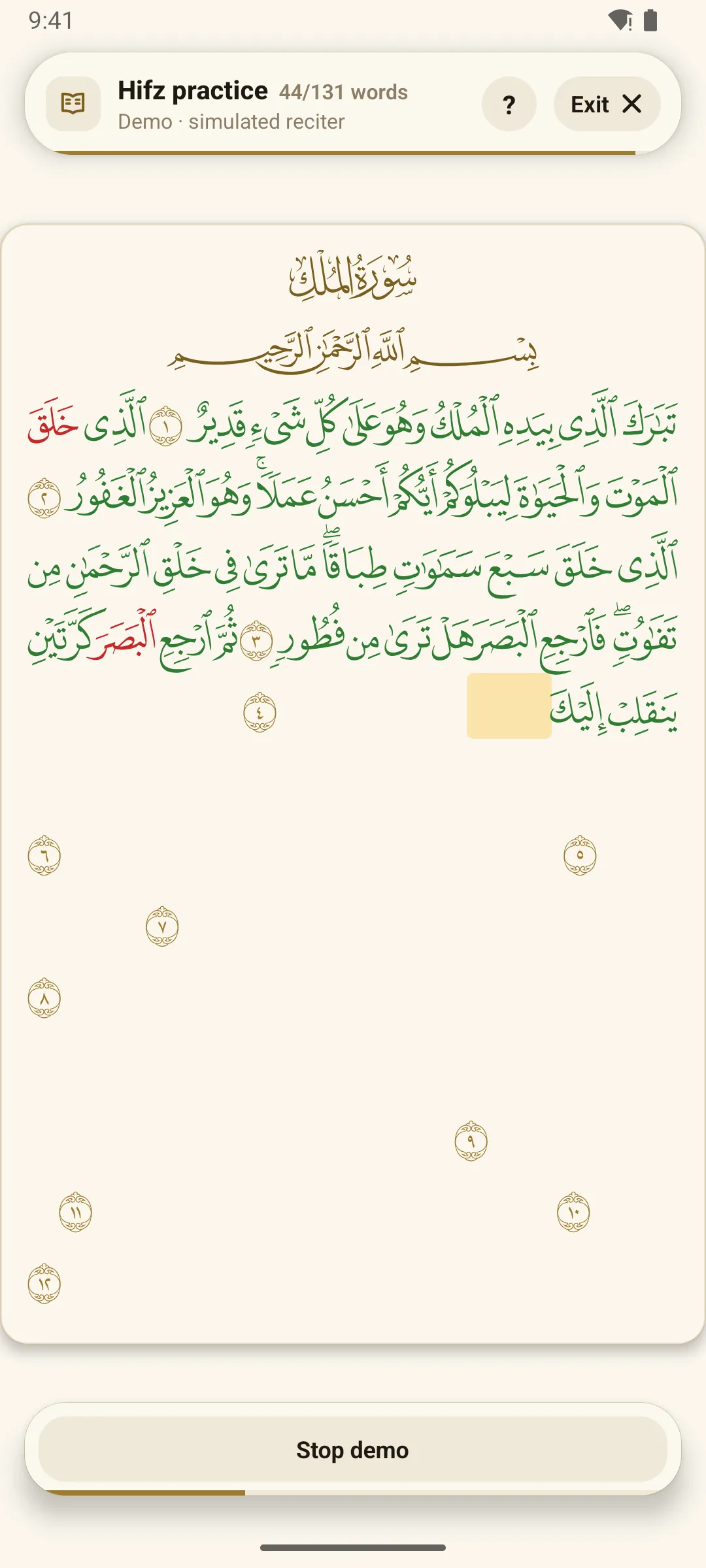
That alignment is what lets an app mark the actual Mushaf page as you go. In Quran Mushaf, a word turns green when it matches, amber when it is close but something needs care, and red when it is missed, skipped or clearly different.
What it checks after each ayah
Once an ayah is complete, the app looks more closely at the details teachers listen for. Quran Mushaf checks whether long vowels (madd) are held, whether similar letters such as س and ص or ت and ط were distinguished, whether short vowels (harakat) and doubled letters (shadda) were given their due, and whether the echo of qalqalah is present on ق ط ب ج د.
- Madd: long vowels held for their length
- Makharij: similar letters kept apart
- Harakat and shadda: vowels and doubled letters
- Qalqalah: the bounce on the five letters
Why it runs on your phone
Quran Mushaf downloads its recitation model once, about 73 MB, and then works offline. Your voice is processed on the device and never uploaded. That matters for privacy, and it also means the check works in a masjid basement or on a plane.
Where it still makes mistakes
Background noise, a reciter speaking very quickly, and the subtlest rules of tajweed, such as the exact length of a madd or the degree of nasalisation in ghunnah, are still hard for any automatic system. The app can mark a correct word amber, or miss a small slip.
That is why the app offers Lenient, Normal and Strict checking, and why it describes itself as a practice partner. Treat red as a prompt to listen again, not a verdict.
A routine that works
Listen to an ayah first with a reciter such as Al-Husary, whose measured style is easy to follow. Then recite it yourself with the check on Lenient, fix the red words, and move to Normal. Bring the ayat that stay amber to your teacher: those are exactly the places a human ear is most valuable.